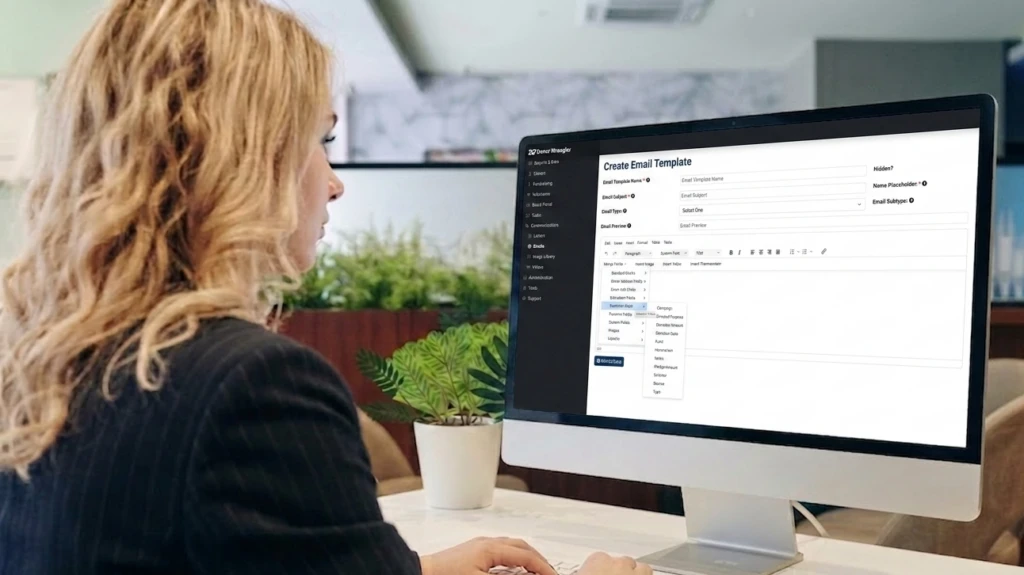
How to Write Fundraising Emails that Work with Donor Wrangler: Templates, Stats and Best Practices
While platforms like LinkedIn and X (formerly Twitter) have their place, email remains the most reliable tool in your nonprofit’s toolkit for connecting directly with those who care about your mission. In fact, recent benchmarks show that nonprofits generate an average of $58 for every 1,000 fundraising emails sent, consistently outperforming paid social and direct mail on a cost-per-dollar-raised basis.
However, to see these results—and likely even better—your emails must be more than just well-structured; they must speak directly to the hearts of your supporters. Much like building a monthly giving program, success in the inbox requires a mix of clear strategy, personal connection, and a deep understanding of what actually moves your audience to act.
That is why we created this guide on how to design emails that convert. We’ll break down the structure of a high-performing appeal and share subject line strategies that ensure your message is actually opened and read. We’ve also included seven copy-and-paste templates to save you time on your most common campaigns. Whether you’re reaching out to a handful of major donors or re-engaging a list of 5,000, these best practices provide the framework you need to turn casual subscribers into dedicated partners in your mission.
The Essential Framework for a High-Converting Fundraising Email
In a fundraising email, every sentence either moves a donor closer to a gift, or creates a reason for them to stop reading. To see real results from your next campaign, these core components must work together to build a clear, persuasive case for support.
| Element | Purpose | Common mistake to avoid |
|---|---|---|
| Subject line | Gets the email opened. Your entire campaign hinges on this. | Vague, generic, or too long (keep under 50 characters) |
| Preview text | The 40–90 character snippet below the subject line in the inbox. Many readers decide here. | Letting it default to “View this email in your browser” |
| Personalized greeting | “Dear Sarah” outperforms “Dear Friend” on open-to-click rate by an average of 14% (Campaign Monitor). | Using a generic salutation on a segmented list |
| Hook / appeal | The emotional reason to give. Lead with a story or striking fact, not an organizational overview. | Opening with “We are a nonprofit that…” |
| Specific ask | State the exact amount and what it does. “$50 feeds a family for a week” converts better than “donate today”. | Asking vaguely without anchoring a dollar amount |
| Call to action (CTA) | One button, one link, one job. Make it impossible to miss. | Multiple competing links that dilute click intent |
| Impact proof | A stat, photo, or story snippet showing where the money goes. | Skipping this — donors who see impact give 2× as often (Nonprofit Quarterly) |
| Contact info | Required by CAN-SPAM. Also builds trust. | Burying it or omitting it entirely |
Optimize Your Preview Text
Use Donor Wrangler’s Preview Text feature to see exactly how the short snippet in your prospect’s inbox will appear. This is a crucial step to capture their attention and encourage them to actually open the email. Write your snippet in a way that complements the subject line while adding a sense of urgency or curiosity. For the best results, aim for 40–90 characters.
15 Fundraising Email Subject Lines That Get Opened
Your subject line is the most important piece of copy in your campaign. The email may be an absolute masterpiece, but if the subject line doesn’t pique the interest of your prospect the moment they see it, chances are your message goes straight to the “Trash.”
While industry averages for nonprofits have shifted due to recent privacy updates, a strategic, tested subject line still has the power to push your engagement toward the 40% mark. To help you craft a subject line that makes your potential donors stop scrolling and start reading, we’ve gathered 15 high-performing examples across seven proven strategies, ready for you to adapt today.
| Strategy | Subject line example | Why it works |
|---|---|---|
| Urgency | 24 hrs left: double your gift | Deadline creates action; shortened for mobile and lower spam risk. |
| Urgency | We’re $4,200 short of our goal — will you help? | Specificity makes the gap feel closable |
| Personalization | Can we count on you, [First Name]? | Direct address raises open rate 14% on average |
| Personalization | [First Name], a small ask (30 seconds) | Conversational and transparent |
| Impact story | See how your gift changed Leo’s life | Named subject creates emotional connection |
| Impact story | What $25 looked like last Tuesday | Dollar amount + recency = concrete and credible |
| Statistic | 1 in 5 kids stay hungry here. (We can fix that.) | Local stat + solution bridge prevents despair without action. |
| Statistic | We served 2,847 families last month. Here’s how. | Specific numbers signal transparency |
| Gratitude | Because of you, we hit our goal! | Celebrates the donor, not just the org. (Use only for prior donors.) |
| Gratitude | Look what you helped us build this year | Ownership language (“you helped”) drives re-engagement |
| Curiosity | Something big is happening on Tuesday… | Ellipsis and vagueness earn the click |
| Curiosity | We’ve never asked for this before | Novelty signal; works once, use sparingly |
| Question | What happens when funding runs out? | Stakes-framing prompts emotional engagement |
| Question | $50 + a cause you love = ? | Puts the donor in the driver’s seat |
| Re-engagement | Missed you, [First Name] – things are different now | Combines personalization with curiosity |
Subject line checklist
Use these four rules of thumb for every subject line you write:
- Keep it under 50 characters (9 words or fewer for mobile)
- Avoid spam trigger words: FREE, ACT NOW, CLICK HERE, !!, etc.
- A/B test every campaign — even a 3% lift in open rate compounds over a year
- Emoji: use one max, at the end, only if it fits your brand voice
Nonprofit Email Benchmarks: Best Send Times and Frequency
Understanding the data behind your digital fundraising is just as critical as the stories you tell. To help you evaluate your performance, we’ve analyzed the latest industry data and outlined the best-performing benchmarks for nonprofits. Use the tables below to compare your current metrics against the top performers and discover the best times to send your emails and why they work.
Open rates and click-through rates
| Metric | Nonprofit average | Top-quartile benchmark | What moves the needle |
|---|---|---|---|
| Open rate | 25–29% | 40%+ | Subject line, sender name, and donor base engagement. |
| Click-through rate (CTR) | 2.6% | 4.5–6% | Single CTA, button design, mobile formatting |
| Click-to-open rate (CTOR) | 10.2% | 12–18% | Relevance of content to audience segment |
| Unsubscribe rate | 0.20% | Below 0.15% | Sending frequency and value-to-ask ratio. |
| Deliverability rate | ~97% | 99%+ | Technical setup (SPF/DKIM) and list cleaning. |
Best days and times to send
| Send window | Performance signal | Best for |
|---|---|---|
| Tuesday 8–10 AM | Highest average open rate across sectors | Year-end appeals, major announcements |
| Thursday 8–10 AM | Strong second for nonprofits; lower mid-week competition | Monthly giving invitations, event invites |
| Wednesday 7–9 PM | High engagement among mobile users checking before bed | Re-engagement emails, thank-you notes |
| Sunday evening | Elevated for faith-based and community organizations | Mission-driven storytelling emails |
| Avoid: Monday AM | Inbox is fullest; your email competes with weekend backlog | — |
Finding the Right Sending Frequency
Donor fatigue is a legitimate concern, but for most organizations, the silence of under-communicating is far more dangerous. In reality, the revenue lost by staying quiet often outweighs the cost of a few unsubscribes. To keep your mission top-of-mind without overwhelming your supporters, use these healthy email fundraising best practices:
- General List: Aim for at least emails per month to maintain a consistent connection.
- Active Campaigns: During high-stakes periods like year-end, don’t be afraid to send daily for a short stretch.
- Re-engagement: Send a sequence of three emails over 21 days to win back lapsed supporters. If they remain inactive, it is best to remove them to protect your deliverability.
- Monthly Donors: Send one dedicated impact report per month in addition to your general newsletters.
Pro Tip: Segment Before You Send
Losing a donor is rarely caused by the number of emails you send, but rather by sending content that doesn’t resonate with the recipient. When every supporter receives the exact same message regardless of their history, engagement drops.
Donor Wrangler provides built-in segmentation tools that let you filter your database by giving level, last gift date, or event attendance. Instead of manually sorting spreadsheets, you can instantly create targeted recipient lists, ensuring every supporter receives a message that reflects their unique relationship with your mission. The results speak for themselves: segmented campaigns average 14% higher open rates and a staggering 101% higher click-through rate compared to non-segmented sends.
Mobile Email Optimization: The $0-Cost Nonprofit Conversion Fix
More than 55% of nonprofit emails are opened on mobile devices. If your email isn’t designed for a thumb, you’re leaving money on the table. Use this checklist to ensure your message is readable and clickable on every screen:
| Element | Mobile requirement | Why it matters |
|---|---|---|
| Donate button | Minimum 44×44px tap target; full-width on small screens | Apple’s Human Interface Guidelines minimum — smaller buttons are literally hard to hit |
| Font size | Body text minimum 16px; CTA button text minimum 18px | Sub-16px text forces pinch-zoom and kills conversions |
| Layout | Single-column only | Two-column layouts collapse unpredictably across email clients |
| Images | Max 600px wide; include descriptive alt text | Many mobile clients block images by default; Alt Text is the only way to understand your story. |
| Subject line | Under 40 characters for mobile preview (iPhone cuts at ~35) | Long subject lines show as “Save the date for our annual gala…” |
| CTA placement | Above the fold AND repeated at the bottom | Many mobile readers don’t scroll; put the button where they stop |
| Link spacing | 8px minimum gap between any two tappable links | Mis-taps on clustered links trigger unsubscribes and frustration |
7 Fundraising Email Templates to Boost Your Donations
We know how hard writing an email from scratch can be. To help you scale your outreach quickly and easily, we’ve developed these seven high-conversion templates. Each one is a fully-formed example rather than a basic outline, designed specifically to follow the mobile-first and segmentation strategies we’ve covered.
To get started, simply fill in the details for your specific mission, adjust the gift amounts to match your goals, and you are ready to reach your donors.
Email Templates
Subject: Final $[Amount]: Will you close the gap?
Preview Text: Your gift doubles until midnight to help [Specific Population].
Dear [First Name],
Twelve months ago, you helped us [Specific Impact, e.g., open our doors to 847 families]. Today, we’re writing because we’re just $[Amount] away from our year-end goal of $[Total Goal]. We need your help to close that gap before the clock strikes midnight.
A gift of $[Amount 1, e.g., $50] today means [Concrete Impact]. Thanks to our year-end matching challenge, your $[Amount 1] becomes $[Amount 1 x 2] to help [Specific Population/Service]. Whatever you can give before midnight on New Year’s Eve will be matched dollar-for-dollar by [Matching Donor Name], effectively doubling your impact at no extra cost to you.
[ Double My Gift Before Midnight ]
With gratitude,
[Your Name/Executive Director Name]
[Organization Name] | [Address] | [Phone Number]
Subject: A simple way to make a lasting difference every month
Preview Text: For just $[Amount]/month, you can join a circle of dedicated supporters making a lasting impact
Hi [First Name],
Big change doesn’t happen all at once. It happens through consistency. It happens through people like you who show up month after month.
That’s why we created our [Program Name] Monthly Circle. This group of dedicated supporters allows us to plan ahead, hire expert staff, and serve our community without the uncertainty of one-time fundraising cycles.
For only $15 a month, which is less than a streaming subscription, you’ll provide [specific monthly impact].
You can cancel at any time, but most of our monthly donors find so much value in this program that they’ve been with us for over three years. Will you join the [Number] other supporters who already give monthly?
[ Become a Monthly Donor — it’s just $15/month ]
With gratitude,
[Your Name/Executive Director Name]
[Organization Name] | [Address] | [Phone Number]
Subject: You’re invited: [Event Name] on [Date] — seats are going fast
Preview Text: Join us for an evening of [Description] to support [Cause]. Secure your limited seat today!
Hi [First Name],
We’d love to see you at [Event Name] on [Date] at [Venue, City].
It’s an evening of [brief description: e.g., stories, dinner, live music] dedicated to [Cause/Program]. Every ticket purchased goes directly toward providing [specific service] for [population].
Last year, this community raised $[Amount], which helped us [specific outcome]. This year we’re aiming even higher, and we want you in the room to help us reach our new goal.
Tickets are [Price] and seating is limited to [Number] guests. Tables of 8 are available for [Table Price].
Questions? Just reply to this email or call [Phone Number].
[ Reserve My Seat ]
With gratitude,
[Your Name/Executive Director Name]
[Organization Name] | [Address] | [Phone Number]
Subject: Look what you made possible, [First Name]
Preview Text: See the tangible proof of how your support provided [Specific Result] for [Person’s Name].
Dear [First Name],
We wanted to send you something: proof.
Because of your gift of $[Amount] on [Date], [Person’s Name / Group]
now has [specific, tangible result — e.g., “a safe place to sleep,”
“three months of job training,” “access to clean water”].
[One or two sentences of their story — first name only, with permission.]
You did that. It wasn’t us. It was you.
We’ll keep you updated as [his/her/their] story continues. In the
meantime, if you’d like to give again or share this story with a friend
who might want to get involved, we’d be grateful.
[ See More Stories Like This ]
With gratitude,
[Your Name/Executive Director Name]
[Organization Name] | [Address] | [Phone Number]
Subject: We’ve missed you, [First Name] — here’s what’s new
Preview Text: It’s been a while! See the milestones you helped achieve and what we’re working on now.
Hi [First Name],
It’s been a while since we last connected, and so much has happened at [Organization Name] since you last supported us in [Year].
Here’s a quick snapshot of what your past support helped build:
– [Achievement 1, with specific number]
– [Achievement 2, with specific number]
– [Achievement 3, with specific number]
We’re not writing to ask for anything today. We just wanted you to
know: you were part of this. And if you’d like to be part of what’s
coming next, we’d love to have you back.
Here’s what we’re working on right now: [1–2 sentences on current
campaign or program]. It’s some of the most meaningful work we’ve done.
[ See What’s Happening Now ]
With gratitude,
[Your Name/Executive Director Name]
[Organization Name] | [Address] | [Phone Number]
Pro-Tip: Focus on the power of the story
No donate button here. Since you promised a no-ask email, link to a Recent Wins video or story instead. If they’re inspired, they’ll find a way to give on their own.
Use this specifically for donors who gave $500+ but haven’t contributed in 12–18 months.
Subject: [First Name], we’ve held a seat for you (no ask inside)
Preview Text: I’d love to share a personal briefing on our progress over coffee—no donation required.
Dear [First Name],
It’s been [X months/years] since you last supported [Organization Name]. In that time, we’ve thought of you often, especially during [specific milestone or challenge].
I’m not writing to ask for a gift. Instead, I want to offer you a personal briefing.
We’ve made significant progress on [specific program], and your past support helped lay the groundwork. I’d love 15 minutes of your time—whether by phone or coffee—to share what we’ve learned and where we’re headed.
No donation required. Just a conversation.
If you’re open to it, simply reply “yes” to this email, and my team will reach out within 48 hours to schedule.
[ Reply “Yes” – No Donation Needed ]
With gratitude,
[Your Name/Executive Director Name]
[Organization Name] | [Address] | [Phone Number]
P.S. If you’d rather just see a two-page impact summary, you can [Download the PDF here]. No call required.
Subject: Look what we raised at [Event Name]!
Preview Text: Together we raised $[Total]! See the event photos and the impact you made for [Population].
Dear [First Name],
Thank you for being part of [Event Name] on [Date]. Because of you and [Number] other attendees, we raised $[Total Raised]. That is enough to [concrete outcome, e.g., fund 200 backpacks].
Here is one moment you made possible:
[Short 1-sentence story: e.g., “Maria, a single mom of three, told us she finally feels safe tonight.”]
See the event photos – [ View the Event Gallery ] (Instruction: Use Donor Wrangler’s “Full-Width” button style for this link)
Help us improve. Take a 90-second survey to help us plan for next year: [Survey Link]
We can’t wait to see you next year!
With gratitude,
[Your Name/Executive Director Name]
[Organization Name] | [Address] | [Phone Number]
Pro-tip: Prioritize “pure gratitude” in your first follow-up to keep your unsubscribe rate below the 0.15% industry benchmark. Instead of an immediate ask, use Donor Wrangler’s Automated Triggers to schedule an impact update 30–45 days later as this is the optimal time to invite donors into your monthly giving circle.
Send these directly from Donor Wrangler
Donor Wrangler’s Marketing Emails module lets you store, personalize, and send all seven of these templates without ever switching platforms. Merge Fields automatically pull in donor names and gift history, keeping your outreach personal without the manual effort.
When using these templates in Donor Wrangler’s Marketing Emails module, we recommend using the Button Element rather than a text link for your primary call to action. This ensures your “Donate” button meets the 44x44px “thumb-friendly” standard, making it easy for the 55% of donors reading on mobile to take action instantly.
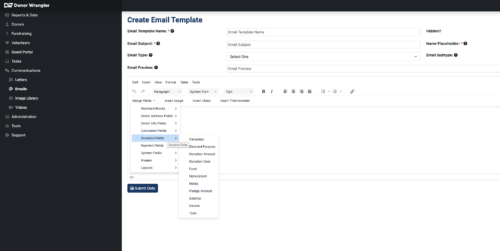
Donor Wrangler’s merge fields in action – personalization without manual work.
You can even set Automated Triggers to fire the thank-you template the moment a gift is recorded. That way, no donor waits more than a few minutes to feel the impact of their generosity.
Maximizing Donations: Advanced Tips for Your Email Fundraising Campaigns
Maintaining an Engaged Donor Base
A smaller, engaged donor base always outperforms a massive, inactive list. To protect your deliverability and sender reputation, retire supporters who haven’t opened an email in over a year, or try a quick re-engagement sequence to win them back first. Fortunately, Donor Wrangler automatically handles the CAN-SPAM Act requirement to honor user requested unsubscribes, so you can stay focused on your mission.
A/B testing
Only test one variable at a time, like your subject line, send time, or CTA, to see what truly clicks with your donors. Run your tests on at least 20% of your list before sending the top performer to the rest. Over a year of consistent testing, these small wins compound into a significant funding lift for your mission.
Segmentation
The most successful email fundraising campaigns treat their list as a collection of distinct groups, rather than one big crowd. You should segment by:
- Giving level (first-time, recurring, lapsed, major)
- Engagement (opened in last 90 days vs. 91–365 vs. never)
- Interest area (if you collect this at signup or event registration)
- Geography (for events or locally-specific impact stories)
Highlight impact clearly
Supporters who see a direct link between their gift and a clear outcome give more often and more generously. Make your impact concrete by replacing vague appeals with specific examples, such as how a set dollar amount provides a specific number of supplies for those you serve. Use real names, specific numbers, and authentic photos whenever you can to build trust.
Automate your gratitude
A thank-you email sent within 24 hours of a gift sees a 42% higher open rate than one sent later. Set up the automated thank you emails to be sent within Donor Wrangler’s donation forms system so no donor is left waiting. Follow up with an impact update 30–45 days later to share what their gift accomplished before you send your next appeal.
Manage Your Email Fundraising Campaigns in Donor Wrangler
Running successful email fundraising campaigns means keeping your donor data, your outreach, and your results all in one spot. The Donor Wrangler Marketing Emails module is built exactly for this.
| Feature | What it does for your campaigns |
|---|---|
| Audience segmentation | Split your list by giving history, engagement level, interests, or any custom field in seconds |
| Merge Fields | Personalize subject lines, greetings, and gift amounts automatically from your donor records |
| Automated triggers | Send thank-you emails the moment a gift is recorded; schedule re-engagement sequences in advance |
| Direct send | Send fundraising emails without exporting to a third-party platform — all data stays in one hub |
| CAN-SPAM compliance | Unsubscribes are handled automatically and synced to your donor records |
| Reporting | Track open rates, CTR, and donations attributed to each campaign in one dashboard |
Ready to put these email fundraising best practices to work? Sign up for a Guided Walkthrough today and we’ll show you how Donor Wrangler can help you implement strategies from this guide — from segmentation and templates to automated gratitude and campaign reporting.