
Donor Wrangler Version 84 Released
We’re happy to announce the release of Donor Wrangler version 84, an update that contains a number of new features and improvements to further streamline some things.
New Features
Pledge Mode on Donation Forms – By request, donation forms can now have an option to allow the donor to request to be contacted in order to fulfill their donation. This method, if chosen, will trigger a different email template to be sent to them. It will also create a task to a designated user in the system to ensure that they follow up on the pledge.
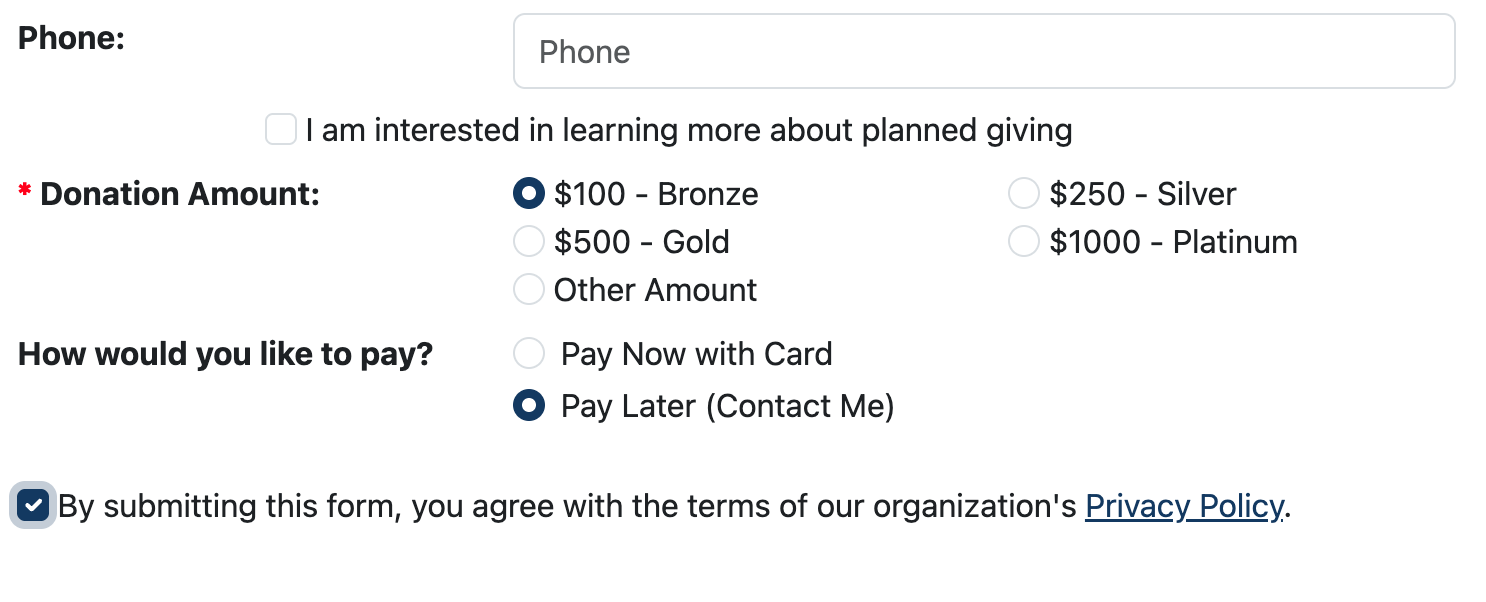
This option is ideal for organizations that may receive a lot of support from older donors who are suspicious of online giving options and don’t want to share their card number online. It’s off by default. To turn it on, go to the Form Labels and Fields tab in the donation form editor, where you’ll find the option to enable it. You’ll then need to also set the new emails that will be sent to users when they choose this option.
Improvements
Emails:
- The visual email editor has a new, customizable 50/50 element that can be added. This lets you more quickly and easily add two column content blocks, and configure the width of each column.
General:
- We’ve updated the text editor used throughout the system with a new library. It works nearly identically, so users should notice no difference, but is being actively maintained and will offer greater flexibility in the future.
Grants:
- A new “Recognition Name” has been added to grants, allowing you to more easily name grants received from Community Foundations where multiple pots of money are being distributed.
Interactions:
- If you use Moves Management, you can quickly set their status when adding an interaction to a donor’s profile.
Registration Forms:
- Refunds for form submissions can now be made directly within the system.
- Attendees can now be easily reassigned to different date options, with the inventory numbers automatically being updated when someone is reassigned.
Reports:
- New columns for donor stats have been added to more easily track donor giving obligations, among other things. They include:
- Donor Most Recent Attendance Date
- Donor Most Recent Registration Form Submission Date
- Donor Expected Payments Current Year
- Donor Expected Payments 1, 2, 3, 4, or 5 Years Ago
- Donor Expected Payments 1, 2, 3, 4, or 5 Years Ahead
- Donor Remaining Expected Payment Count
- Donor Remaining Expected Payment Amount
Tasks:
- Tags can now be configured to fire task templates when they are assigned to a donor for the first time. To enable this, go to the administration area, edit a tag, and set its assigned task template.
Volunteer Forms:
- A new Expand All Roles button has been added, allowing you to quickly open all of the accordions and see every registrant.
If you have any suggestions for further changes, we would welcome them! Write us at [email protected].